---
title: "New 'Reports Viewed' Export: Released May 12, 2023"
description: Download your 'Reports Viewed' statistics to see what percentage of your school reports have been viewed.
---
[Skip to content](https://helpdesk.possip.com/knowledge/new-reports-viewed-export-released-april-27-2023#main-content)
English
Show submenu for translations
![POSSIP LOGO PNG-Jun-08-2021-02-15-02-88-PM.png\]](https://helpdesk.possip.com/hs-fs/hubfs/POSSIP%20LOGO%20PNG-Jun-08-2021-02-15-02-88-PM.png?height=40&name=POSSIP%20LOGO%20PNG-Jun-08-2021-02-15-02-88-PM.png)
- [Default HubSpot Blog](https://possipit-5933397.hs-sites.com/blog)
Open main navigation
Close main navigation
- [Default HubSpot Blog](https://possipit-5933397.hs-sites.com/blog)
- English
Show submenu for translations
- Go to possip.com
Go to possip.com
Hello. How can we help you?
- There are no suggestions because the search field is empty.
1. [Help Desk](https://helpdesk.possip.com/knowledge?hsLang=en)
2. [Archived](https://helpdesk.possip.com/knowledge/archived?hsLang=en)
# New 'Reports Viewed' Export: Released May 12, 2023
## Download your 'Reports Viewed' statistics to see what percentage of your school reports have been viewed.
Please note: The Possip platform is evolving! This article serves as a log of our feature releases over time and may contain now outdated screenshots and videos. Contact your Customer Relationship Manager if you have any questions about what you see here compared to what you see when you log in to the live platform!
'Reports Viewed' or 'Reports To Be Viewed' is a table on the District Dashboard that denotes the percentage of reports that have been viewed for each school within a district.
**Note: This feature is only available for District Accounts.**
### How to View
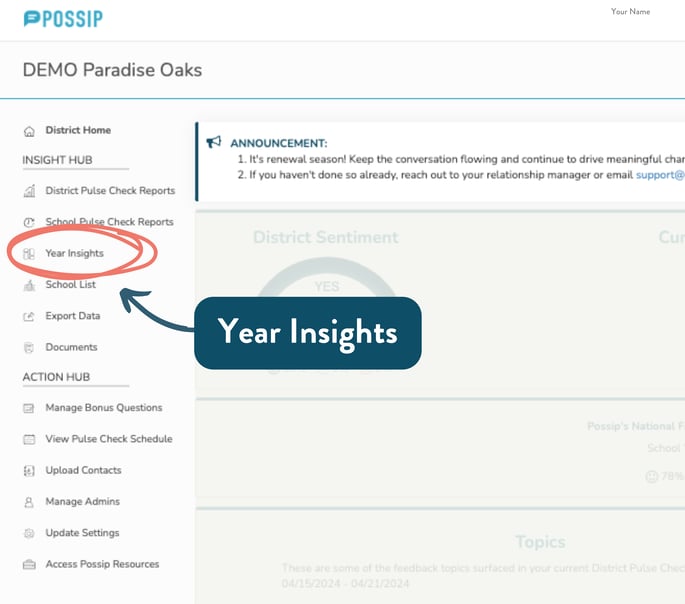
**STEP 1:** Log in to[https://www.weeklypossip.com/](https://www.weeklypossip.com/) (as a district administrator) and click on **"Year Insights."**
****
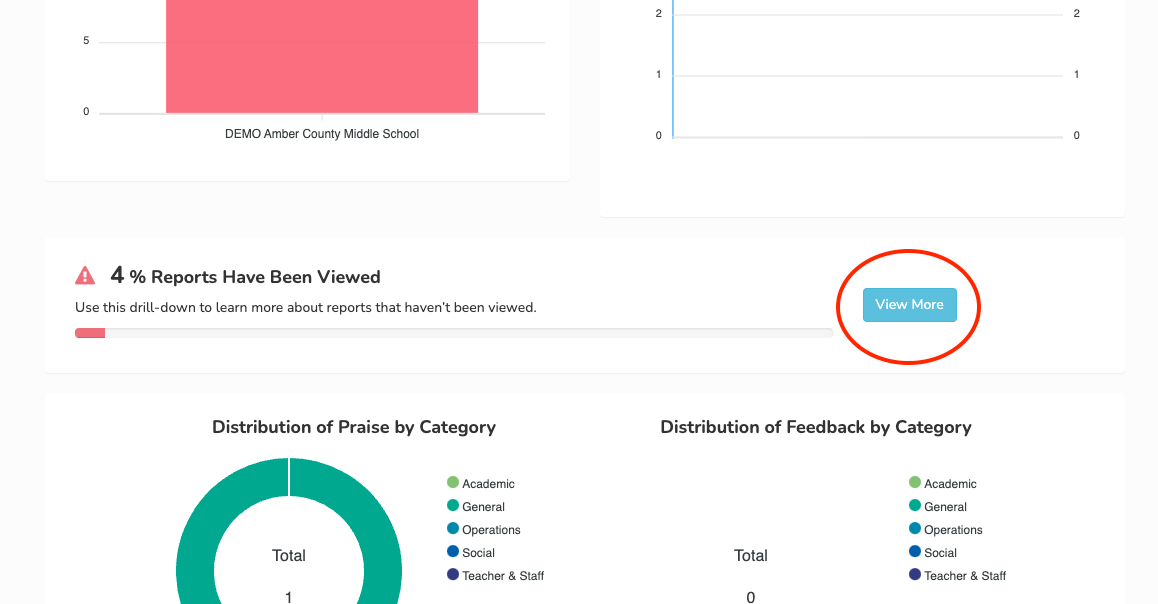
**Step 2:** Scroll to the middle of the page and find the "Reports Have Been Viewed" section. Click on the "View More" button.
**Step 3:** Select the school year and the downloadable format for the Report data you would like to see.
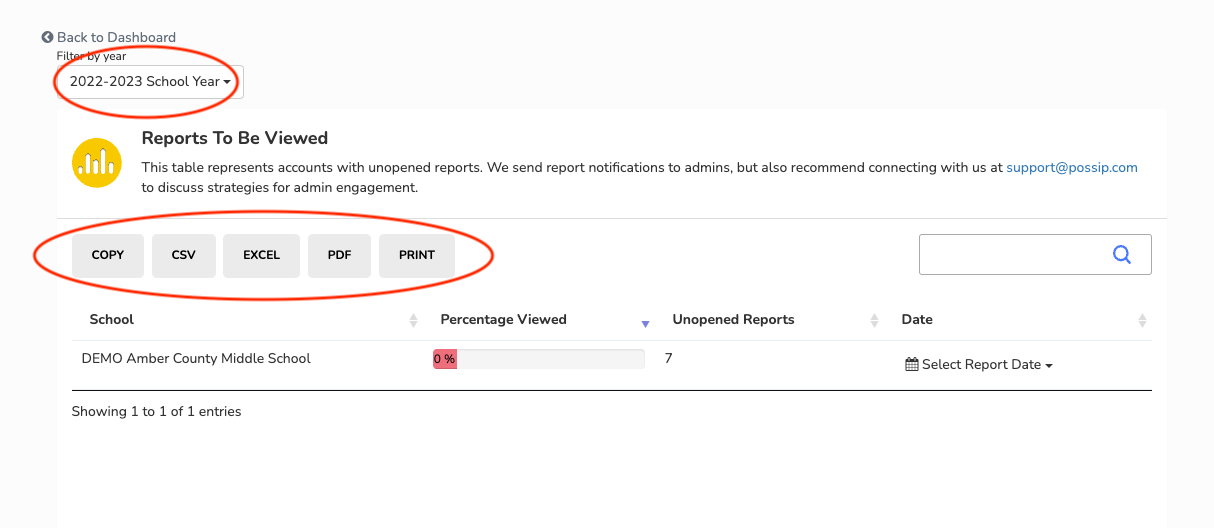
**Step 4**: After choosing your downloadable format, the Reports Viewed Export will download automatically. Please check your downloads folder.
If you have any questions about this process, please [send us an email](mailto:support@possip.com) or use our chat!
- [Getting Started](https://helpdesk.possip.com/knowledge/getting-started?hsLang=en#main-content)
- [Account Setup and Admin Management](https://helpdesk.possip.com/knowledge/getting-started?hsLang=en#account-setup-and-admin-management)
- [Proof of Consent](https://helpdesk.possip.com/knowledge/getting-started?hsLang=en#proof-of-consent)
- [Managing User Contact Lists](https://helpdesk.possip.com/knowledge/getting-started?hsLang=en#managing-user-contact-lists)
- [Promotional Materials](https://helpdesk.possip.com/knowledge/getting-started?hsLang=en#promotional-materials)
- [Terms, Policies, and Data Security](https://helpdesk.possip.com/knowledge/getting-started?hsLang=en#terms-policies-and-data-security)
- [Account Settings](https://helpdesk.possip.com/knowledge/account-settings?hsLang=en#main-content)
- [Account Management](https://helpdesk.possip.com/knowledge/account-settings?hsLang=en#account-management)
- [Pulse Check™ Settings](https://helpdesk.possip.com/knowledge/account-settings?hsLang=en#pulse-check-settings)
- [How to Use Possip Platform](https://helpdesk.possip.com/knowledge/how-to-use-possip-platform?hsLang=en#main-content)
- [Accessing the Possip Platform](https://helpdesk.possip.com/knowledge/how-to-use-possip-platform?hsLang=en#accessing-the-possip-platform)
- [Report Basics](https://helpdesk.possip.com/knowledge/how-to-use-possip-platform?hsLang=en#report-basics)
- [Report Sections](https://helpdesk.possip.com/knowledge/how-to-use-possip-platform?hsLang=en#report-sections)
- [Reports For Organization/District Leaders](https://helpdesk.possip.com/knowledge/how-to-use-possip-platform?hsLang=en#reports-for-organization-district-leaders)
- [Dashboards](https://helpdesk.possip.com/knowledge/how-to-use-possip-platform?hsLang=en#dashboards)
- [Closing Feedback Loop](https://helpdesk.possip.com/knowledge/how-to-use-possip-platform?hsLang=en#closing-feedback-loop)
- [Exporting Data](https://helpdesk.possip.com/knowledge/how-to-use-possip-platform?hsLang=en#exporting-data)
- [Sharing Praise](https://helpdesk.possip.com/knowledge/how-to-use-possip-platform?hsLang=en#sharing-praise)
- [Social Media & Communications](https://helpdesk.possip.com/knowledge/how-to-use-possip-platform?hsLang=en#social-media-communications)
- [Pulse Checks®️](https://helpdesk.possip.com/knowledge/pulse-checks%EF%B8%8F?hsLang=en#main-content)
- [All About Pulse Checks](https://helpdesk.possip.com/knowledge/pulse-checks%EF%B8%8F?hsLang=en#all-about-pulse-checks)
- [Bonus Questions](https://helpdesk.possip.com/knowledge/pulse-checks%EF%B8%8F?hsLang=en#bonus-questions)
- [Promo Items for Schools or Districts](https://helpdesk.possip.com/knowledge/pulse-checks%EF%B8%8F?hsLang=en#promo-items-for-schools-or-districts)
- [Promo Items for Organizations](https://helpdesk.possip.com/knowledge/pulse-checks%EF%B8%8F?hsLang=en#promo-items-for-organizations)
- [Promo Items for Students](https://helpdesk.possip.com/knowledge/pulse-checks%EF%B8%8F?hsLang=en#promo-items-for-students)
- [Flexible Surveys](https://helpdesk.possip.com/knowledge/flexible-surveys?hsLang=en#main-content)
- [Promotional Materials for Flexible Surveys](https://helpdesk.possip.com/knowledge/flexible-surveys?hsLang=en#promotional-materials-for-flexible-surveys)
- [Templates for Flexible Surveys](https://helpdesk.possip.com/knowledge/flexible-surveys?hsLang=en#templates-for-flexible-surveys)
- [Bonus Questions](https://helpdesk.possip.com/knowledge/bonus-questions?hsLang=en#main-content)
- [Bonus Questions by Topic](https://helpdesk.possip.com/knowledge/bonus-questions?hsLang=en#bonus-questions-by-topic)
- [Bonus Questions for Businesses, Nonprofits, & Organizations](https://helpdesk.possip.com/knowledge/bonus-questions?hsLang=en#bonus-questions-for-businesses-nonprofits-organizations)
- [Bonus Questions for K-12 Schools and Districts](https://helpdesk.possip.com/knowledge/bonus-questions?hsLang=en#bonus-questions-for-k-12-schools-and-districts)
- [Bonus Questions for Higher Education](https://helpdesk.possip.com/knowledge/bonus-questions?hsLang=en#bonus-questions-for-higher-education)
- [Archived](https://helpdesk.possip.com/knowledge/archived?hsLang=en#main-content)
- [Live Links](https://helpdesk.possip.com/knowledge/archived?hsLang=en#live-links)
- [Default HubSpot Blog](https://possipit-5933397.hs-sites.com/blog)
[](http://possipit.com)
possip.com Help Desk - ©2022 Possip®, Inc.
Copyright © 2026, Possip