---
title: How to Format and Upload a List for Student Pulse Checks
description: Follow these instructions to successfully export a list of contacts we can import for your Pulse Checks®.
---
[Skip to content](https://helpdesk.possip.com/knowledge/how-to-format-and-upload-a-list-for-student-pulse-checks#main-content)
English
Show submenu for translations
![POSSIP LOGO PNG-Jun-08-2021-02-15-02-88-PM.png\]](https://helpdesk.possip.com/hs-fs/hubfs/POSSIP%20LOGO%20PNG-Jun-08-2021-02-15-02-88-PM.png?height=40&name=POSSIP%20LOGO%20PNG-Jun-08-2021-02-15-02-88-PM.png)
- [Default HubSpot Blog](https://possipit-5933397.hs-sites.com/blog)
Open main navigation
Close main navigation
- [Default HubSpot Blog](https://possipit-5933397.hs-sites.com/blog)
- English
Show submenu for translations
- Go to possip.com
Go to possip.com
Hello. How can we help you?
- There are no suggestions because the search field is empty.
1. [Help Desk](https://helpdesk.possip.com/knowledge?hsLang=en)
2. [Archived](https://helpdesk.possip.com/knowledge/archived?hsLang=en)
# How to Format and Upload a List for Student Pulse Checks
## Follow these instructions to successfully export a list of contacts we can import for your Pulse Checks®.
Need instructions on formatting and uploading a contact list for Parent Pulse Checks? Read [this article](https://helpdesk.possip.com/knowledge/how-to-format-and?hsLang=en).
### Formatting a List
When pulling a contact list from your Student Information System or staff database, please export the following columns into a spreadsheet:
*Please note, if you are unable to provide all of the following fields, it is okay. The most important fields are student first and last name, student grade, parent first and last name, parent email, and parent phone. Providing parent language data will also enable us to send Pulse Checks in a parents' preferred language. *
- Student ID
- Student First Name
- Student Last Name
- Student Grade (Please use the grade codes listed in the sample spreadsheet in your export. For example, PK, K, 1, 2, 3, 4, 5, etc).
- Student Email
- Student Phone\*
- Contact Phone Type (If you know it, include the phone type of mobile, landline, or undefined in this field).
- Student Language - ([Click here](https://hubs.ly/H0PZqYq0) for a list of languages Possip translates).
- School Name
Your spreadsheet can be formatted using any spreadsheet software, including Microsoft Excel or Google Sheets.
\*Not required. Only include if your district approves.
### Formatting Contact Lists for Multiple Schools
If you are preparing contact lists for multiple schools at once, use the "school name" column to indicate which school each student is affiliated with.
If your data export creates a tab or workbook for each school, create a blank “All Contacts” tab and copy and paste the data from each individual tab.
### Uploading a List
When you are ready to upload your new contact list, please complete the following steps.
**STEP 1:** Log in to [https://www.weeklypossip.com/login](https://www.weeklypossip.com/login).
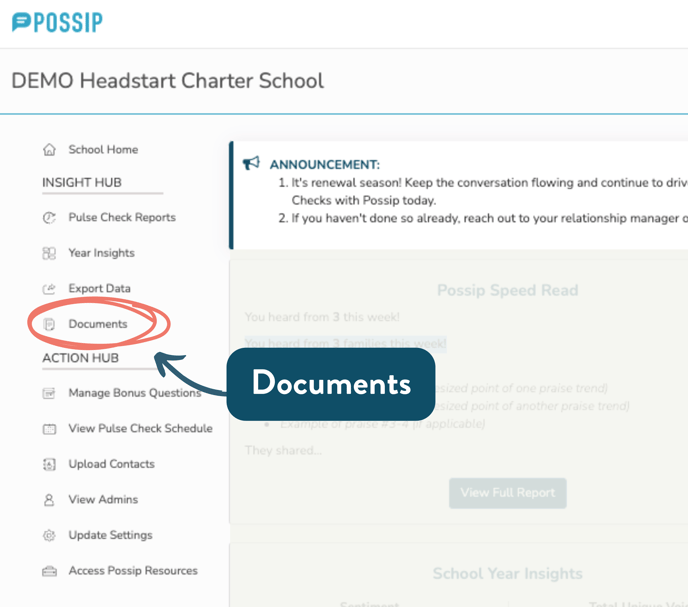
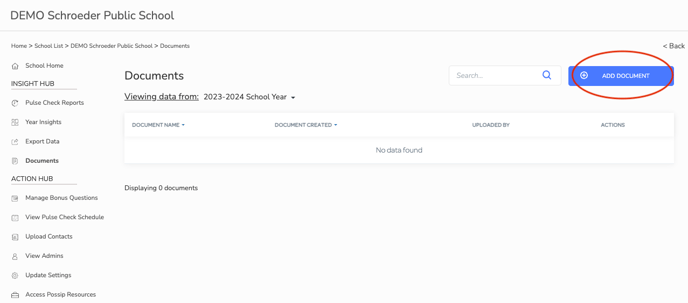
**STEP 2:** Click on “Documents” and “Add Document” and attach your document.
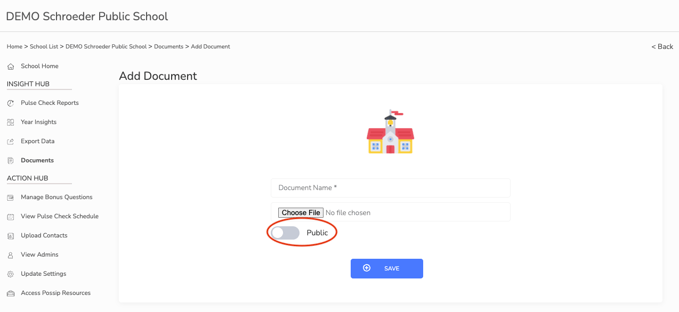
**STEP 3**: Click “Save.”
**Note:** Make sure you leave the setting on "public" to allow Possip and any admin on your team with login credentials to view it.
- [Getting Started](https://helpdesk.possip.com/knowledge/getting-started?hsLang=en#main-content)
- [Account Setup and Admin Management](https://helpdesk.possip.com/knowledge/getting-started?hsLang=en#account-setup-and-admin-management)
- [Proof of Consent](https://helpdesk.possip.com/knowledge/getting-started?hsLang=en#proof-of-consent)
- [Managing User Contact Lists](https://helpdesk.possip.com/knowledge/getting-started?hsLang=en#managing-user-contact-lists)
- [Promotional Materials](https://helpdesk.possip.com/knowledge/getting-started?hsLang=en#promotional-materials)
- [Terms, Policies, and Data Security](https://helpdesk.possip.com/knowledge/getting-started?hsLang=en#terms-policies-and-data-security)
- [Account Settings](https://helpdesk.possip.com/knowledge/account-settings?hsLang=en#main-content)
- [Account Management](https://helpdesk.possip.com/knowledge/account-settings?hsLang=en#account-management)
- [Pulse Check™ Settings](https://helpdesk.possip.com/knowledge/account-settings?hsLang=en#pulse-check-settings)
- [How to Use Possip Platform](https://helpdesk.possip.com/knowledge/how-to-use-possip-platform?hsLang=en#main-content)
- [Accessing the Possip Platform](https://helpdesk.possip.com/knowledge/how-to-use-possip-platform?hsLang=en#accessing-the-possip-platform)
- [Report Basics](https://helpdesk.possip.com/knowledge/how-to-use-possip-platform?hsLang=en#report-basics)
- [Report Sections](https://helpdesk.possip.com/knowledge/how-to-use-possip-platform?hsLang=en#report-sections)
- [Reports For Organization/District Leaders](https://helpdesk.possip.com/knowledge/how-to-use-possip-platform?hsLang=en#reports-for-organization-district-leaders)
- [Dashboards](https://helpdesk.possip.com/knowledge/how-to-use-possip-platform?hsLang=en#dashboards)
- [Closing Feedback Loop](https://helpdesk.possip.com/knowledge/how-to-use-possip-platform?hsLang=en#closing-feedback-loop)
- [Exporting Data](https://helpdesk.possip.com/knowledge/how-to-use-possip-platform?hsLang=en#exporting-data)
- [Sharing Praise](https://helpdesk.possip.com/knowledge/how-to-use-possip-platform?hsLang=en#sharing-praise)
- [Social Media & Communications](https://helpdesk.possip.com/knowledge/how-to-use-possip-platform?hsLang=en#social-media-communications)
- [Pulse Checks®️](https://helpdesk.possip.com/knowledge/pulse-checks%EF%B8%8F?hsLang=en#main-content)
- [All About Pulse Checks](https://helpdesk.possip.com/knowledge/pulse-checks%EF%B8%8F?hsLang=en#all-about-pulse-checks)
- [Bonus Questions](https://helpdesk.possip.com/knowledge/pulse-checks%EF%B8%8F?hsLang=en#bonus-questions)
- [Promo Items for Schools or Districts](https://helpdesk.possip.com/knowledge/pulse-checks%EF%B8%8F?hsLang=en#promo-items-for-schools-or-districts)
- [Promo Items for Organizations](https://helpdesk.possip.com/knowledge/pulse-checks%EF%B8%8F?hsLang=en#promo-items-for-organizations)
- [Promo Items for Students](https://helpdesk.possip.com/knowledge/pulse-checks%EF%B8%8F?hsLang=en#promo-items-for-students)
- [Flexible Surveys](https://helpdesk.possip.com/knowledge/flexible-surveys?hsLang=en#main-content)
- [Promotional Materials for Flexible Surveys](https://helpdesk.possip.com/knowledge/flexible-surveys?hsLang=en#promotional-materials-for-flexible-surveys)
- [Templates for Flexible Surveys](https://helpdesk.possip.com/knowledge/flexible-surveys?hsLang=en#templates-for-flexible-surveys)
- [Bonus Questions](https://helpdesk.possip.com/knowledge/bonus-questions?hsLang=en#main-content)
- [Bonus Questions by Topic](https://helpdesk.possip.com/knowledge/bonus-questions?hsLang=en#bonus-questions-by-topic)
- [Bonus Questions for Businesses, Nonprofits, & Organizations](https://helpdesk.possip.com/knowledge/bonus-questions?hsLang=en#bonus-questions-for-businesses-nonprofits-organizations)
- [Bonus Questions for K-12 Schools and Districts](https://helpdesk.possip.com/knowledge/bonus-questions?hsLang=en#bonus-questions-for-k-12-schools-and-districts)
- [Bonus Questions for Higher Education](https://helpdesk.possip.com/knowledge/bonus-questions?hsLang=en#bonus-questions-for-higher-education)
- [Archived](https://helpdesk.possip.com/knowledge/archived?hsLang=en#main-content)
- [Live Links](https://helpdesk.possip.com/knowledge/archived?hsLang=en#live-links)
- [Default HubSpot Blog](https://possipit-5933397.hs-sites.com/blog)
[](http://possipit.com)
possip.com Help Desk - ©2022 Possip®, Inc.
Copyright © 2026, Possip